

Laptop Automotive Scanner Review
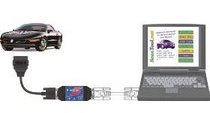
A laptop automotive scanner is the way to go if you already have a laptop, android device or even a PDA. My view on this has recently changed.
I own several hand held auto scan tools and I’ve been resisting the purchase of a ELM type interface tool. ELM is a standard used to translate OBDII language to something a PC can read.
The reason I never bought one before is, I don’t own a laptop. The agency I worked for in conjunction with an overwhelming vote from 12 mechanics, purchased the elm scan 5 with the Bluetooth option. The people I work with think I’m a computer whiz. They assigned me to install and test the diagnostic tool and included software package.
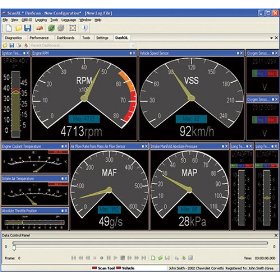
To set the record straight, I am in no way, shape or form a computer whiz, but I let them believe I am because compared to some of the mechanics I’m a computer science major.
Our shop laptop is a tough book that already has Cummings insight software and a few other diagnostic programs installed. The tough book runs Windows 7 professional and is abused regularly by all of us.
The elm laptop automotive scanner is a nice package that comes with basic software, instructions and cables needed to get the diagnostic program going. In about 20 minutes I was scanning the first vehicle for a check engine light problem.
Scanning Vehicles with a Laptop
As I mentioned above, I’m no stranger to using a laptop scan tool on all kinds of vehicles. In fact, the Cummings insight auto repair software program is almost identical to using the elm scan program.
However there’s one big difference. The Cummings diagnostic program uses the serial port for connecting to the vehicle via a cable. This can be a problem when you are trying to view data in the direct sunlight.
You are also limited by the cable length as where you can set up the laptop to start your diagnosis. Serial port connections have a much slower data transfer rate then a USB based or even the blue tooth wireless connection.
The obd II laptop automotive scanner interface that we purchased has the Blue tooth option. The claim is that you can scan the vehicle from 300 feet away. I don’t know if this is true but I must have been at least 100 feet from the vehicle while running through the diagnostic procedures.
The vehicle was outside in the direct sunlight and I moved inside the shop where I found it extremely easy to read the screen. Since our shop is located in South Florida most of the repairs are done outside.
This Bluetooth feature may not be as important for people in other areas of the country that will be performing all of the diagnosis and troubleshooting inside of a garage or shop.
Although Bluetooth has proven itself to be reliable some people like to plug into the car with a cable. if this is the case then there are two reasons to go for the SX (RED) option.
The SX comes with the OBD-wiz software suite, not the troublesome freeware that is floating around. Number two is OBDLink (Red) features firmware you can upgrade. These product enhancements and updates are free for life. How frequent they roll out remains to be seen.
Car Laptop Scanner Diagnostic Procedures
What’s the main difference between using a laptop and a hand-held scanning tool for diagnostics? This is a very good question.
The answer is, there’s almost no difference at all in the available information to the user. The over all capabilities of the units depend on the options included in the software and the capabilities of the automobile.
The big advantage of the ELM type OBDII laptop interface is the ease of use when it comes to reading the display screen. You can also display more information at the same time on the laptop as opposed to a hand-held scanner.
Will I buy this laptop interface for my own personal use? The answer is no I will not, because I still don’t own a laptop nor do I wish to.
However, I might be interested in connecting the Blue tooth unit to my personal desktop computer. With that said, I already own hand held scan tools that do a good job. In fact you can see reviews of my automotive scan tools here.
For those of you that have a laptop or PDA, these laptop automotive scanners should be considered. I don’t want to get in trouble by naming other brands.
From what I could tell the elm scan unit when you get the SX red option comes with OBD II WIZ software has all the drivers and software you need to get it up and running within a few minutes the box is opened.
Some of the other brands require internet downloaded freeware to get the diagnosis going. Give this laptop scanner page a bookmark or share with a friend.
Learn How to use Laptop Scanners Like a Pro
This reference guide is very complete and perfect for diy car mechanics. learn about hand-held diagnostic scan tools and software that turns PCs and Palm Pilots into powerful automobile scanners.
Not only can a laptop automotive scanner be used to fix cars, but they can also be used to maximize your vehicle’s performance and fuel economy.
This book covers what each code means and how to use the power of the scan tool to quickly troubleshoot and repair check engine lights. The guide is illustrated with photos and diagrams to help you understand OBD-I and OBD-II systems.
See how to read the information they record in snap shot mode. It also includes a complete guide to online information sources as well as a comprehensive list of codes, common failures and troubleshooting tips.
The book on the left also has a section dedicated to getting the most from a mobile PC scanner. If you need more information about diagnosis and repair of check engine lights I got you covered. This next link takes you to more of my check engine light help articles.
Depending on the diagnostic trouble code that is stored in memory you still may need a service manual to diagnose the codes. See my video about the factory car repair manuals I recommend.
Learn more about the auto mechanic that built this car website and also what is covered here on the YouFixCars.com Homepage.